
A General Introduction to Maple
Maple is a computer application for advanced mathematics. The way you run Maple depends on the system you are on. Using Microsoft Windows you click on the Maple icon; it has an integral symbol superimposed on a maple leaf. In the Math L;ab
First do some simple arithmetic:
| > | 7*(4^3)/9; |
| > | evalf(7*(4^3)/9); # evalf means give the answer is floating point form, which is computer speak for decimal form. |

| > | 5^77; |

OK, now some algebra:
| > | factor(x^7-1); |

| > | expand((x^3+3*x+1)*(x^2-1)); |

Now for a graph. We plot y= x sin (x) from -3 pi to 3 pi.
| > | plot(x*sin(x),x=-3*Pi..3*Pi,thickness=3,color=black); |
![[Plot]](images/general_intro_6.gif)
Maple can do limis.
| > | limit(tan(3*x)/sin(4*x),x=0); #The equals sign really means "goes toward". |

| > | limit(sin(x^3)/x,x=infinity); |

| > | limit(exp(1/x),x=0,right); #exp(1/x) means "e to the 1/x" and the limit is "x goes to zero from the right" |

| > | limit(exp(1/x),x=0,left); |

Next, some calculus.
| > | diff(x^3*cos(x^2),x); |

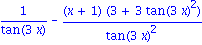
| > | diff((x+1)/tan(3*x),x); |
| > | diff(x^4-5*x^3+7*x^2+7,x); |

| > | solve(diff(x^4-5*x^3+7*x^2+7,x)=0,x); |

Later in the course, Chapter 5, we will do integration, which is the inverse operation of differentiation. The command is int.
| > | int(x*sin(x^2),x); |

| > | int(x*sin(x^2),x=0..sqrt(Pi)); |

| > | plot(x*sin(x^2),x=0..7); |
![[Plot]](images/general_intro_17.gif)
Thus, the area under the first hump is exactly 1.