 which is equal to zero when
 and is
 for positive values of
 . This procedure uses an
Center of Mass Problems with Maple
Michael C Sullivan, Copyright 2000
Introduction
The purpose of this worksheet is to solve center of mass problems for planar regions with variable density functions and to display such regions in a hopefully pleasing manner. To create the density functions we use Maple
procedures
. These are short programs. We give an example. The procedure below defines a function
which is equal to zero when
and is
for positive values of
. This procedure uses an
if-then-else
statement. Translating into English, it says if
 then return the number 0, else (otherwise) return the value
 . The "fi" terminates the range of the "if" structure. The "end" marks the end of the procedure.
>
f:=proc(x)
if x <= 0 then 0
else 2*x^2
fi
end:
Test it for some values of
 .
.
> f(-2);f(-1.2);f(0);f(5);


You will need to load the following packages.
>
with(plots):
with(plottools):
Warning, the name changecoords has been redefined
Warning, the name arrow has been redefined
Example 1
Find the center of mass of the region bounded by
 and
and
 with density function
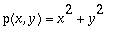 .
.
Solution
First we plot the region in question. Of course finding a good boundary for the plot takes a little work on the side.
>
plot({x+1,x^2-1},x=-1..2,y=-1..3,
thickness=3,color=blue,scaling=constrained);
![[Maple Plot]](Images/center_of_mass15.gif)
Next we set up a Maple procedure which is zero outside our region and is equal to the density function inside the region. We test it for a few values of x and y. You should check some others. Do you see how the procedure works? [I have really put in -1 times the density because of a quirk in Maple that I'll explain below.]
>
density1:=proc(x,y)
if y<=x+1 and y>=x^2-1
then -1*(x^2+y^2)
else 0
fi
end:
> density1(0,0);density1(0,1);density1(1.5,0);density1(1,1);


Next we do a density plot. It will take a minute to run.
>
densityplot(density1,-1..2,-1..3,
axes=boxed,
grid=[100,100],
style=patchnogrid);
![[Maple Plot]](Images/center_of_mass20.gif)
The lighter regions have low density. The darker the region the higher the density. Maple however, does the reverse of this, which why I multiplied the density by -1 above.
Next we set up the integrals.
>
M:=int(int(x^2+y^2,y=x^2-1..x+1),x=-1..2);
MX:=int(int((x^2+y^2)*y,y=x^2-1..x+1),x=-1..2);
MY:=int(int((x^2+y^2)*x,y=x^2-1..x+1),x=-1..2);


The center of mass is then at (MY/M , MX/M).
> MY/M;MX/M;


Finally, we put the plots together, including the center of mass.
>
p1:=plot({x+1,x^2-1},x=-1..2,y=-1..3,thickness=3,color=blue):
p2:=densityplot(density1,-1..2,-1..3,axes=boxed,grid=[100,100],style=PATCHNOGRID):
p3:=disk([MY/M,MX/M],.05,color=red):
display(p3,p2,p1);evalf(MY/M),evalf(MX/M);
![[Maple Plot]](Images/center_of_mass26.gif)

Eample 2
Find the center of mass of the triangular region determined by
 ,
,
 , and
, and
 , with density function
 2
2
 .
.
Solution
Again we plot the region in question.
> plot({2*x+1,1-x,3*x-2},x=0..3,y=0..7,color=blue,thickness=3);
![[Maple Plot]](Images/center_of_mass33.gif)
The Maple procedure is a little tricky this time. Do you see how it works?
>
region2:=proc(x,y)
if y>=1-x and y>=3*x-2 and y<=2*x+1
then -1*(sin(2*x))^2
else 0
fi
end:
> densityplot(region2,0..3,0..7,axes=boxed,grid=[100,100],style=PATCHNOGRID);
![[Maple Plot]](Images/center_of_mass34.gif)
Next we set up the integrals. I leave it to you to figure out how I divided up the region.
> M:=evalf(int(int((sin(2*x))^2,y=1-x..2*x+1),x=0..3/4)+ int(int((sin(2*x))^2,y=3*x-2..2*x+1),x=3/4..3));
>
MY:=evalf(int(int(x*(sin(2*x))^2,y=1-x..2*x+1),x=0..3/4)+
int(int(x*(sin(2*x))^2,y=3*x-2..2*x+1),x=3/4..3));
>
MX:=evalf(int(int(y*(sin(2*x))^2,y=1-x..2*x+1),x=0..3/4)+
int(int(y*(sin(2*x))^2,y=3*x-2..2*x+1),x=3/4..3));



Finally we put everything together.
>
p1:=plot({2*x+1,1-x,3*x-2},x=0..3,y=0..7,color=blue,thickness=3):
p2:=densityplot(region2,0..3,0..7,axes=boxed,numpoints=5000,style=patchnogrid):
p3:=ellipse([MY/M,MX/M], 0.04, 0.1, filled=true, color=red):
display(p3,p2,p1);MY/M,MX/M;
![[Maple Plot]](Images/center_of_mass38.gif)

Example 3
This example uses polar coordinates. Find the center of mass the region given by
 with density
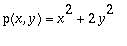 .
.
Solution
We plot the region, using polar coordinates.
> plot(3*cos(t)+4,t=0..2*Pi,coords=polar,color=green,thickness=3);
![[Maple Plot]](Images/center_of_mass42.gif)
We create the denisty function. Notice it uses only retangular coordinates.
>
region3:=proc(x,y)
if sqrt(x^2+y^2)<=3*(x/sqrt(x^2+y^2))+4
then -1*(x^2+2*y^2)
else 0
fi
end:
Next we do the density plot.
> densityplot(region3,-2..7,-5..5,axes=boxed,grid=[100,100],style=PATCHNOGRID);
![[Maple Plot]](Images/center_of_mass43.gif)
It is clear that the center of mas is on the x-axis. Thus, MX=0.
> MY:=int(int(r^4*(cos(t)^2+2*sin(t)^2)*cos(t),r=0..3*cos(t)+4),t=0..2*Pi);
> M:=int(int(r^3*(cos(t)^2+2*sin(t)^2),r=0..3*cos(t)+4),t=0..2*Pi);
> evalf(MY/M);
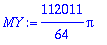


And the final plot!
>
p1:=plot(3*cos(t)+4,t=0..2*Pi,coords=polar,color=green,thickness=3):
p2:=densityplot(region3,-2..7,-5..5,axes=boxed,grid=[100,100],style=PATCHNOGRID):p3:=disk([MY/M,MX/M],.1,color=red):
display(p3,p2,p1);evalf(MY/M),0;
![[Maple Plot]](Images/center_of_mass47.gif)

Homework instructions (Extra Credit!)
Open up a new worksheet. For each of the three problems below turn in the final density plot with the center of mass marked. Show how you setup the integrals. Make sure your name is printed on YOUR homework. You should save your work frequently. Turn in by Nov 3. Counts up to two homework sets.
Prorblem 1
Find the center of mass of the region given by the 2x2 square centered about (1,1) with a quarter circular disk of radius 1 with center (0,0) cut away from it, with density function p(x,y)=2x+y.
Answer
(1.286269780, 1.171543981)
Problem 2
Find the center of mas of the quadrilateral determined by the points (0,0), (1,3), (2,0), (1,1) with density function p(x,y)=xy. Hint: try using the command polygon to plot the region's boundary.
Answer
(1.100000000, 1.625000000)
Problem 3
Find the center of mas of the rectangle with corners (0,0), (0,2), (3,2), (3,0), with density function
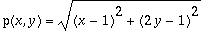 . Hint: use "scaling=constrained" in the display command. Otherwise the rectangle will look like a square.
Answer
(1.644173977 ,1.227034104)