
An Introduction to Maple
Math 305
Here are some practice problems to get you started with Maple. As with any computer application program you can expect to experience a certain amount of frustration in using Maple. Still it is a powerful tool in modern mathematics and the applied sciences. Learning it will be worth the effort. The problems below are not to be turned in. This is just practice.
The first thing to notice is that you can write ordinary text with Maple. This handout was written entirely with Maple. It was then saved as a Maple worksheet. If you click on the "Insert" button
you will see that you can use text, like this paragraph , or Maple input:
> 5+8;
Problem 1: Do simple arithmatic: 2*4, 7^(3+2), exp(1), 5^20, etc.
Problem 2: Plot these functions: x^2, sin x, exp(-x)*cos(x) [exp(x) = e^x], tan(x^2+x).
I'll do the first one.
> plot(x^2,x=-3..3, thickness=2);
![[Maple Plot]](myintroimages/myintro22.gif)
Problem 3: Here are some calculus examples. Play with them.
> int(x^2*sin(x),x);

Note that the +C is missing.
> diff(ln(sin(x^3)),x);

> taylor(tan(x),x=Pi/4,10);


> plot({tan(x),1+2*(x-1/4*Pi)},x=0..2*Pi,y=-4..4,color=[black,red],thickness=2);
Thus, we see that the first two terms of the Taylor series give the equation of the tangent line. Why did Maple plot the vertical lines?
![[Maple Plot]](myintroimages/myintro27.gif)
Problem 4: Use the dsolve command to sovle some first order differential equations.
Here is an example.
> dsolve(diff(y(x),x) +2*y(x) = 3,y(x));
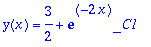
We could rewrite this as y(x) = 3/2 + Ce^(-2x). Or you can hit ctrl m to use Maple's equation editor:
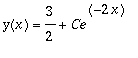 . Ctrl t returns you to text mode.
Problem 5: Graph the solutions for several different values of C. Can you find a short cut?
Problem 6: Plot the direction field.
Problem 7: You can "back up" and edit your maple session. Then you can save it to a disk
and print out your work.