![A1 := MATRIX([[1, -2], [1, -1]])](images/eigenv1.gif)
Eigenvalues and Eigenvectors with Maple
> with(linalg):
This example has complex eingenvalues.
> A1:=matrix([[1,-2],[1,-1]]);
> eigenvalues(A1);

> eigenvectors(A1);
![[I, 1, {VECTOR([1, 1/2-1/2*I])}], [-I, 1, {VECTOR([...](images/eigenv3.gif)
The output format is as follows: [eigenvalue, multiplicity, { basis for eigenspace } ]. Note: the output is in the form of row vectors to save space; the eigenvectors are really column vectors.
This example has three real distinct eigenvalues. This means A can be diagonalized.
> A2:=matrix([[1,2,1],[2,1,1],[1,1,0]]);
![A2 := MATRIX([[1, 2, 1], [2, 1, 1], [1, 1, 0]])](images/eigenv4.gif)
> eigenvalues(A2);
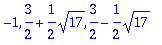
> eigenvectors(A2);
![[-1, 1, {VECTOR([1, -1, 0])}], [3/2+1/2*17^(1/2), 1...](images/eigenv6.gif)
![[-1, 1, {VECTOR([1, -1, 0])}], [3/2+1/2*17^(1/2), 1...](images/eigenv7.gif)
Write this out by hand as. It is a bit hard on the eyes.
This next example has two real distinct eigenvaules. But the eigenspace of 2 is only one dimensional. Hence this matrix cannot be diagonalized.
> A3:=matrix([[2,1,-4],[0,1,3],[0,0,2]]);
![A3 := MATRIX([[2, 1, -4], [0, 1, 3], [0, 0, 2]])](images/eigenv8.gif)
> eigenvalues(A3);

> eigenvectors(A3);
![[1, 1, {VECTOR([1, -1, 0])}], [2, 2, {VECTOR([1, 0,...](images/eigenv10.gif)
This matrix, below, has only two distinct real eigenvaules, but the eigenspaces have full dimension.
> A4:=matrix([[1,2,5],[0,2,0],[0,0,2]]);
![A4 := MATRIX([[1, 2, 5], [0, 2, 0], [0, 0, 2]])](images/eigenv11.gif)
> eigenvalues(A4);

> eigenvectors(A4);
![[2, 2, {VECTOR([2, 1, 0]), VECTOR([5, 0, 1])}], [1,...](images/eigenv13.gif)
Maple does not have a diagonalize command. Instead it has a command called Jordan. Study it and see what it does to the matrices above.